Guide · Checked 10 November 2026
Best timesheet app for Xero? Eight compared for Australian crews (2026)
How eight timesheet apps for Xero compare for Australian field crews: payroll timesheets, invoices, client sign-off and working with no signal.
Written by HoursEasy, which makes one of the tools below. Every claim about another product links to that product's own page, checked on 10 November 2026. Prices and features change, so check before you buy.
How to choose the best timesheet app for Xero
There is no single best timesheet app for Xero: the right one depends on how your crew work and what you bill. If your crew move between jobs and your books are in Xero, five things decide whether an app saves the office any work:
- Payroll timesheets in Xero, against the right earnings rate, ideally split by job.
- Invoices from the same hours, set out the way your client expects.
- Client sign-off on the hours behind each invoice.
- Recording with no signal, for sites out of range.
- Price as the crew grows, per person or per band.
Which one fits you
Each tool's section below ends with who it suits. In short:
- HoursEasy, if your crew move between jobs, you bill clients for the hours, and you want them signed.
- Xero Me / Projects, if you already run Xero Payroll and want your team's timesheets inside Xero itself.
- Jibble, if you want a free time clock and per-employee hours in Xero.
- Deputy, if your work is rostered shifts.
- Tradify, if you want job management with invoicing, and run payroll timesheets separately.
- Fergus, if you want quoting and job management for a trades business, with invoices in Xero.
- Connecteam, if you want scheduling, a time clock and training in one staff app.
- Docketbook, if you buy and supply on dockets and want invoices matched to orders.
Where HoursEasy fits
HoursEasy is ours, so weigh this accordingly. Of the eight tools here, it is the only one with a documented yes in all four columns of the comparison below: payroll timesheets to Xero, invoices to Xero, client sign-off and recording with no signal. Your crew record hours by job on their phone, the client signs a docket that never shows prices, and approved hours arrive in Xero as drafts: a timesheet per person split by earnings rate and, if you map one, project, and an invoice per project.
Xero’s own options
Xero Me is Xero's employee app: employees "fill in and submit timesheets on the Xero Me app" and managers "review, make any corrections, and approve" them (Xero). Xero Projects lets you "record the exact hours your team spends on each job", and Xero says it "automatically populates your online invoices with the right figures" (Xero). Xero's pricing page lists Projects on its Ultimate plans, for 10 users, with $7 per additional user (Xero pricing).
If you use Xero Projects, Xero documents a way to "add project time into payroll timesheets", with conditions in its own words: "Employees need to use the web version of Xero Me to add project time entries to their timesheet" and "You can only add project time from Total hours worked timesheets" (Xero Central, checked 11 November 2026). None of the Xero pages linked here mention client sign-off or offline recording.
Worth a look if: you already run Xero Payroll and want your team's timesheets inside Xero itself.
Jibble
Jibble is "Free forever · Unlimited users" (Jibble pricing). It sends timesheets to Xero payroll in Australia, New Zealand and the UK (Jibble). On invoices, "names of employees in Jibble will be automatically added as invoice lines" (Jibble). Offline, "you can only clock in and out" and "activities and projects cannot be selected" (Jibble). The pages linked here don't mention client sign-off.
Worth a look if: you want a free time clock and per-employee hours in Xero.
Deputy
Deputy describes itself as "rostering, HR and payroll working together around every shift", from $6.75 per user per month (Deputy pricing). It exports approved timesheets to Xero, and can export them "as either client invoices or contractor bills", with the Xero contact "set to the corresponding Deputy Location or Area" (Deputy). Offline on the mobile app, "you may not create new tasks, timesheets, schedules, or announcements", while an iPad kiosk can "start and end both scheduled and unscheduled shifts" (Deputy help). The pages linked here don't mention client sign-off.
Worth a look if: your work is rostered shifts.
Tradify
Tradify is "the job management app trusted by 60,000+ tradespeople worldwide" (Xero App Store), from $48 AUD per user a month ex GST (Tradify pricing). Invoices and payments sync both ways with Xero (Xero App Store), but "timesheets are not sent to Xero as part of the Xero Integration and must be manually entered into Xero" (Tradify help). Tradify says it "does not work offline" (Tradify help).
Worth a look if: you want job management with invoicing, and run payroll timesheets separately.
Fergus
Fergus is "job management software that helps trades businesses quote faster, cut admin, run more profitable jobs and get paid sooner" (Xero App Store). Its invoices "automatically sync with Xero" (Fergus help), and its Sign Off Certificate gets "a site visit, time entry or entire job signed off by a member of your team or your client", by uploading an image of the signature (Fergus help). Its help centre says "you can create, edit and update time entries without an internet connection" (Fergus help). Its Xero listing shares invoices, accounts, reports, payments, credit notes and contacts (Xero App Store).
Worth a look if: you want quoting and job management for a trades business, with invoices in Xero.
Connecteam
Connecteam "helps business to easily schedule work, track hours, provide professional training and stay connected with their teams" (Xero App Store). It exports hours to Xero payroll in Australia, New Zealand and the UK, with an option to "show pay rules by job" (Connecteam help). It is free for up to 10 users, and its paid plans are priced in US dollars, from US$29 a month for the first 30 users (Connecteam pricing). Its mobile time clock does "not support offline clock in or clock out" (Connecteam help). The pages linked here don't mention invoicing in Xero or client sign-off.
Worth a look if: you want scheduling, a time clock and training in one staff app.
Docketbook
Docketbook's home page says "Digital dockets. Daily costs. 3-way-matched invoices." (Docketbook). An unsigned docket alerts the client "via text or email so they can sign" (Docketbook), dockets can be signed offline (Docketbook), and "approved timesheet data flows into Xero or MYOB for invoicing, and into Excel for payroll processing" (Docketbook). Pricing depends on docket volume (Docketbook pricing).
Worth a look if: you buy and supply on dockets and want invoices matched to orders.
HoursEasy
HoursEasy is ours. What it does, from the product itself:
- Hours by job, on the phone, with or without signal. Hours, items and signatures are saved on the phone and sent when it's back in range.
- Client sign-off without paper. The client signs a docket on your phone or from an emailed link. It shows hours and roles, never prices, and hours changed after signing are flagged.
- Payroll timesheets that can split by job. Approved hours go to Xero Payroll AU as a draft timesheet per person, each line an earnings rate and, if you map one, a project.
- An invoice per project. A draft invoice per project for your client, a line per role or item priced from its rate table, with the works summary attached.
- Nothing final until you say so. Everything arrives in Xero as a draft; your crew need no Xero login.
- One price per crew size. $45 a month for up to 5 people, $79 for 10, $139 for 20 and $249 for 40, ex GST. Free for two, a 30-day trial on paid plans, and we'll help you set it up (HoursEasy).
HoursEasy does no award interpretation, PAYG, super or STP; those stay with your payroll.
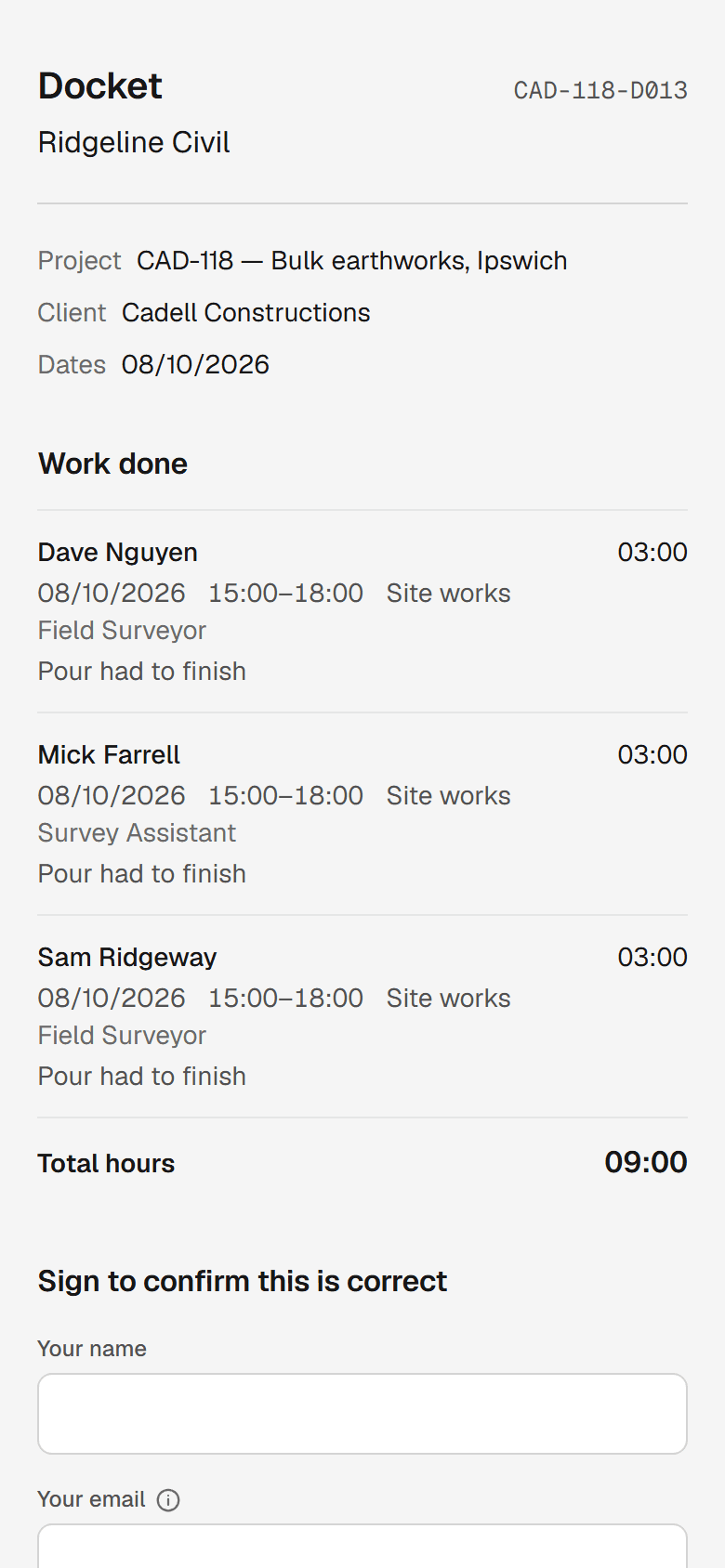
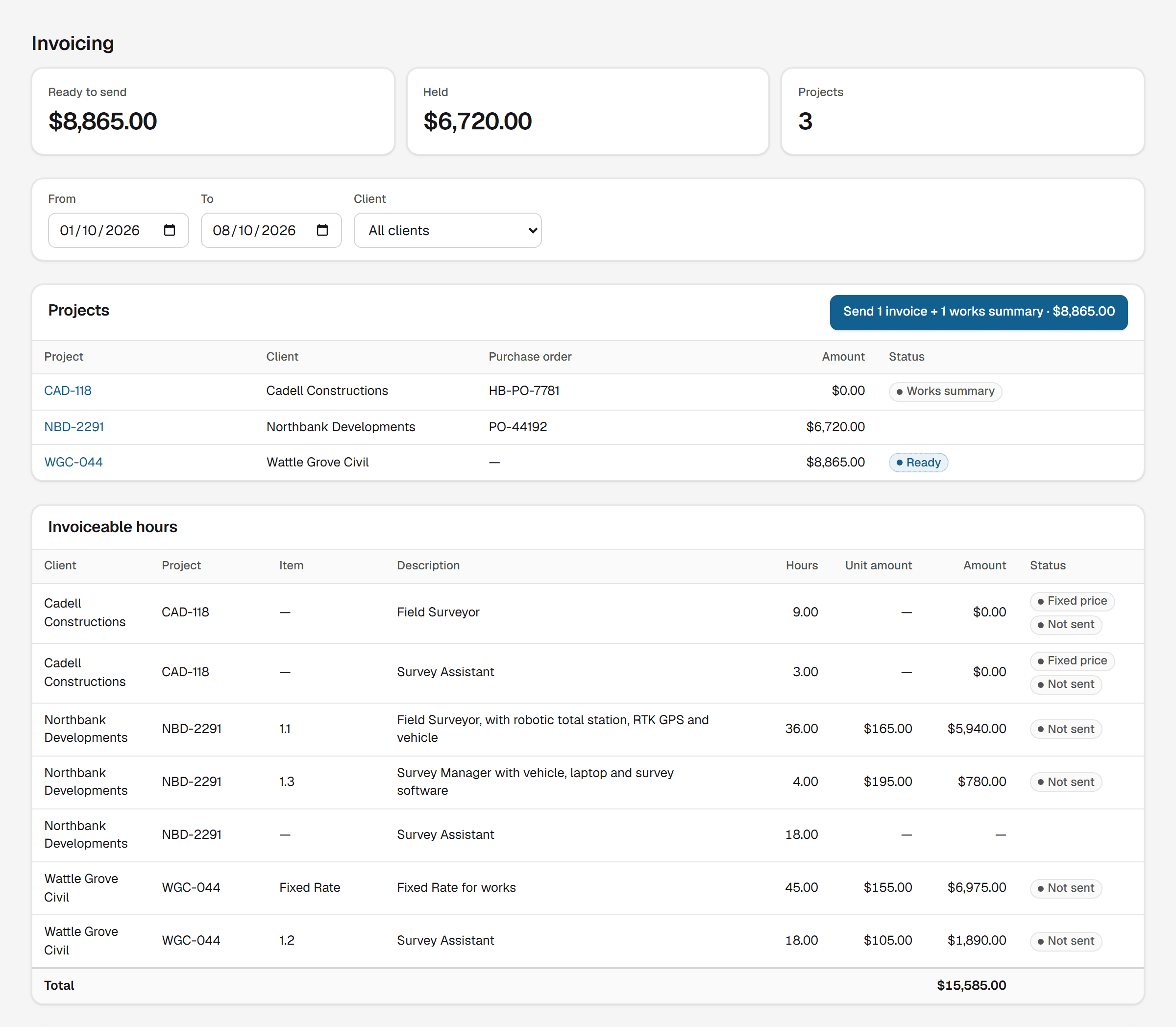
Worth a look if: your crew move between jobs, you bill clients for the hours, and you want them signed.
At a glance
| App | Payroll timesheets to Xero | Invoices to Xero | Client sign-off | No signal |
|---|---|---|---|---|
| HoursEasy | Yes, drafts by rate and project | Yes, a draft per project | Yes, signed docket | Yes |
| Xero Me / Projects | Yes, Xero Me | Yes, Projects | Not documented | Not documented |
| Jibble | Yes | Yes, a line per employee | Not documented | "only clock in and out" |
| Deputy | Yes | Yes, by location or area | Not documented | Kiosk can start and end shifts |
| Tradify | "not sent to Xero" | Yes | Not documented | "does not work offline" |
| Fergus | Not documented | Yes | Sign Off Certificate | Time entries |
| Connecteam | Yes | Not documented | Not documented | "do not support offline clock in" |
| Docketbook | Not documented | Yes | Yes | Yes |
HoursEasy
Ours- Payroll timesheets to Xero
- Yes, drafts by rate and project
- Invoices to Xero
- Yes, a draft per project
- Client sign-off
- Yes, signed docket
- No signal
- Yes
Xero Me / Projects
- Payroll timesheets to Xero
- Yes, Xero Me
- Invoices to Xero
- Yes, Projects
- Client sign-off
- Not documented
- No signal
- Not documented
Jibble
- Payroll timesheets to Xero
- Yes
- Invoices to Xero
- Yes, a line per employee
- Client sign-off
- Not documented
- No signal
- "only clock in and out"
Deputy
- Payroll timesheets to Xero
- Yes
- Invoices to Xero
- Yes, by location or area
- Client sign-off
- Not documented
- No signal
- Kiosk can start and end shifts
Tradify
- Payroll timesheets to Xero
- "not sent to Xero"
- Invoices to Xero
- Yes
- Client sign-off
- Not documented
- No signal
- "does not work offline"
Fergus
- Payroll timesheets to Xero
- Not documented
- Invoices to Xero
- Yes
- Client sign-off
- Sign Off Certificate
- No signal
- Time entries
Connecteam
- Payroll timesheets to Xero
- Yes
- Invoices to Xero
- Not documented
- Client sign-off
- Not documented
- No signal
- "do not support offline clock in"
Docketbook
- Payroll timesheets to Xero
- Not documented
- Invoices to Xero
- Yes
- Client sign-off
- Yes
- No signal
- Yes
Every row comes from the sources linked above, checked on 10 November 2026. "Not documented" means the vendor pages linked here don't mention it, not that the feature doesn't exist.
Common questions
Which timesheet apps send payroll timesheets to Xero?
Of the eight in this guide, five document it: Xero Me, Jibble, Deputy, Connecteam and HoursEasy. Jibble and Connecteam cover Xero payroll in Australia, New Zealand and the UK. HoursEasy sends draft timesheets to Xero Payroll AU, a line per earnings rate and, if you map one, project.
Which ones also put invoices in Xero?
Xero Projects, Jibble, Deputy, Tradify, Fergus, Docketbook and HoursEasy all document invoices in Xero. They are set out differently: Jibble adds a line per employee, and Deputy sets the Xero contact by location or area. HoursEasy drafts one invoice per project, a line per role or item.
Which apps let the client sign off the hours?
Fergus, Docketbook and HoursEasy document it. Fergus’s Sign Off Certificate takes an uploaded image of the signature, and Docketbook alerts the client by text or email so they can sign. HoursEasy’s client signs a docket that shows hours and roles, never prices.
Which ones work with no phone signal?
Fergus documents offline time entries, Docketbook documents offline docket signing, Deputy’s iPad kiosk can start and end shifts offline, and Jibble documents offline clock-in and clock-out. HoursEasy saves hours, items and signatures on the phone and sends them when it’s back in range.
Is there a free timesheet app for Xero?
Jibble lists a free-forever plan for unlimited users, and Connecteam is free for up to 10 users. HoursEasy is free for two people; paid plans start at $45 a month ex GST, with a 30-day trial.