Setting up your business · For admins
A project's rate table
Pricing role lines and item lines, copying rates between projects, and why an unpriced line blocks a send.
A project's rate table is the only place a price lives in HoursEasy. This is how to add lines to it, what each field does, and why an unpriced line stops an invoice rather than quietly leaving something off it.
The video adds a role line and an item line, and shows an unpriced role holding an invoice.
Role lines and item lines
Open a project and press Add role line or Add item line. A role line prices one of your roles by the hour; an item line prices one of your items by whatever unit it is counted in.
- Give the line an Item code — it auto-numbers from the last one, but stays editable, because this is the client's own reference for the line and it prints on their works summary exactly as typed.
- Write the Description the way the client's own schedule words it, not the way your role or item is named internally.
- Choose which role or item this line prices. Once something is priced it is not offered again — edit the existing line to change its rate instead.
- Set the Unit price. It has to be above zero: a rate table with no line for a role or item is how "not charged on this project" is said, so a zero-priced line would say the same thing in a way that prints as a $0 row on a client's document.
- On an item line, tick Recorded by staff if your staff should be able to put this on a timesheet from their phone. Leave it off for anything the office assigns instead — hire, mobilisation, a monthly service. Nothing reaches an invoice because somebody tapped a prompt: this box is what turns that prompt on.
- Adjust Print order if you want this line somewhere other than last on the schedule. Lines print low to high, and the gaps of ten exist so you can slot one line between two others without renumbering the rest.
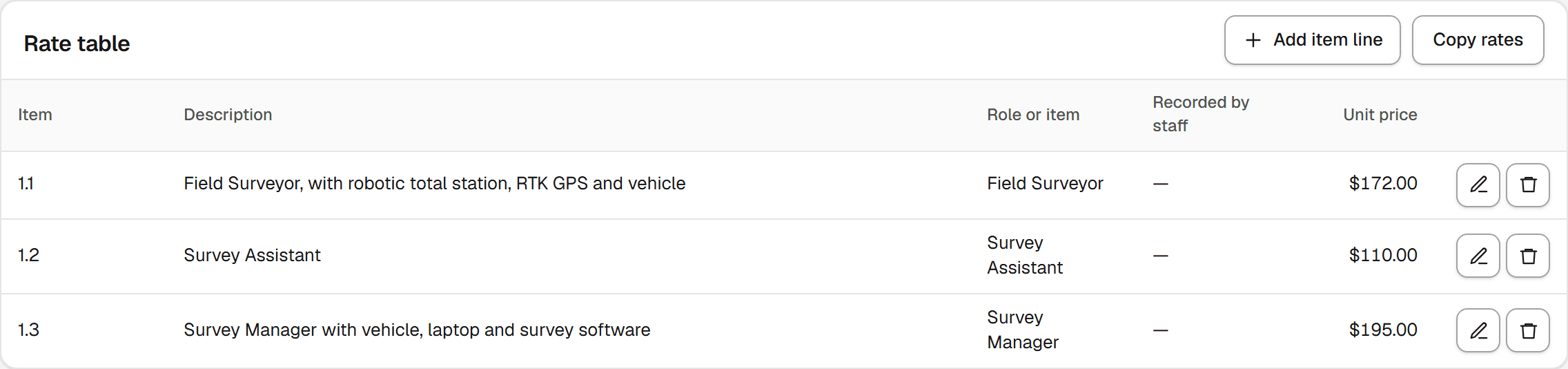
Every line on the table prints on the works summary, even one with nothing recorded against it this period — the schedule is the agreement between you and the client, not a report of what happened to be worked.
If a project has nothing left to price, the form tells you so instead of offering an empty choice: "Every role is already priced" on the role side, and the equivalent for items. Add the role or item first — see roles and task types and items — then come back and price it here.
Copying a rate table
Copy rates from another project copies every line from another project onto this one in one go, which is the fast way to start a client's second job from their first. It copies, never links: renegotiating one job's rates never touches the other's.
What an unpriced line blocks
A chargeable hour worked against a role this project has no line for cannot be sent — sending refuses the whole period's hours while one exists, rather than quietly dropping it from the invoice. Price the role, or mark the task type it was recorded under as not chargeable, before you try again.
Still stuck? Email hello@hourseasy.com. All help articles